International Relations Information System
The engagement side of international education, finally on one data model.
Commercial products in this field are built around student applications and visa compliance. The work international offices do with each other — agreements, delegations, exchange balances, the contacts who hold a relationship together — is left to spreadsheets and email threads. IRIS covers that gap.
In production use at a partner university · your own database · your data stays exportable
A few minutes through a working system with demo data. Music: “Dance” by Infraction · CC BY 3.0

The concept
One connected record of everything an international office does.
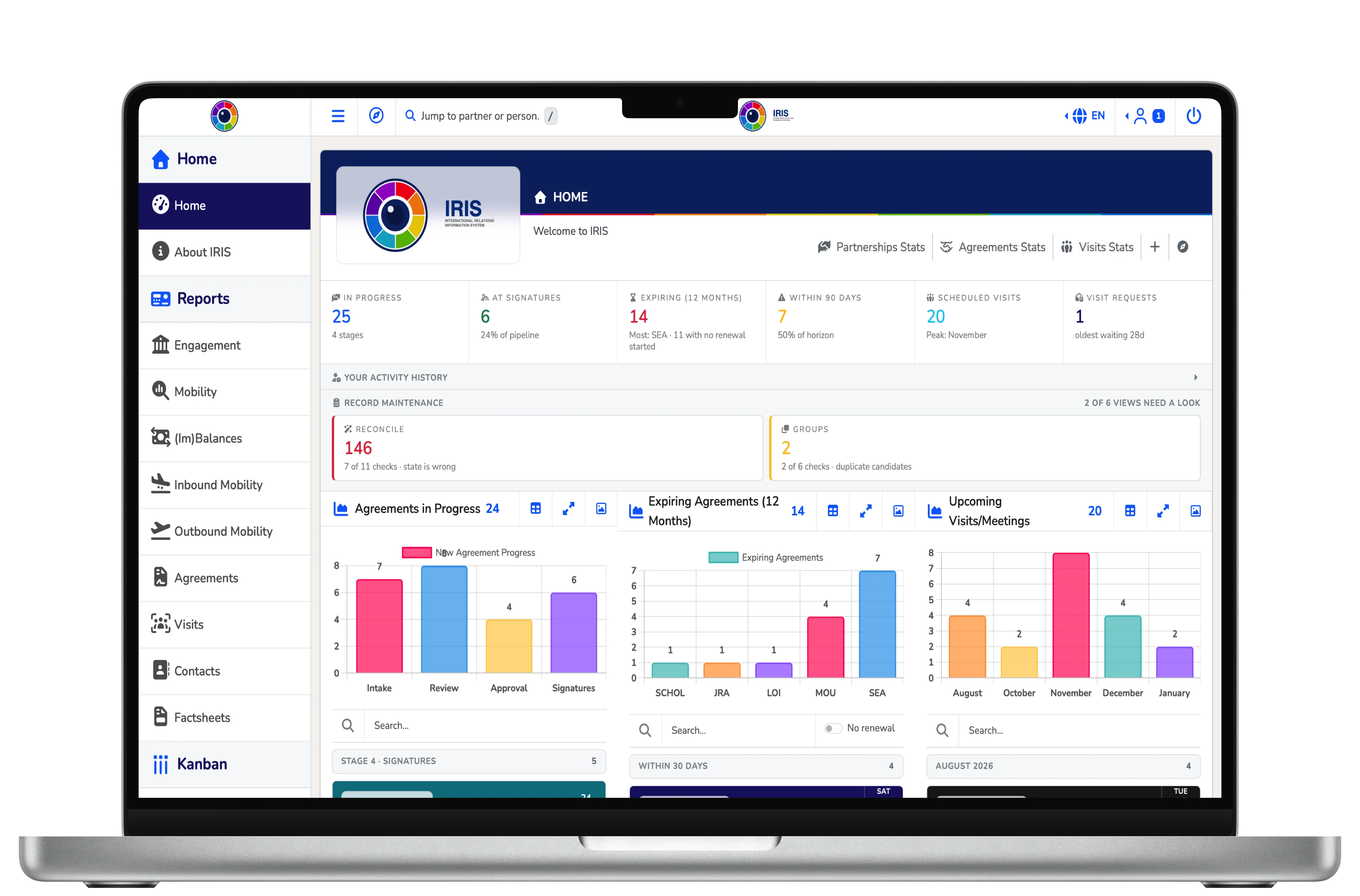
IRIS consolidates the raw material that makes up an office's institutional knowledge — agreements with partner universities, student exchange records, visiting delegations, contact networks, partnership pipelines and engagement metrics — into a single connected platform. Before it, that lived in scattered spreadsheets, email threads and one-off documents, maintained by different staff across different years, in different formats and naming schemes.
Questions like these can take hours of manual reconciliation, in addition to having data accuracy issues:
- How balanced is our exchange relationship with this partner across the past decade?
- What is the full history of agreements with this university?
- What kind of collaboration is the College of Engineering actually involved in?
- When did this delegation last visit us, and who did they meet?
In IRIS each question can be answered in seconds. The system does not replace the work of international affairs — it streamlines and amplifies it by filling a missing tool.
Four systems most offices assemble by hand, but built from the ground up as one.
Generic CRMs and ERPs treat international affairs as an afterthought to configure around. IRIS is shaped to the vocabulary of the field from the very beginning.
System of record
The authoritative store for agreements, mobility, visits, contacts and institutional profiles — replacing the spreadsheets and shared drives that held them in non-queryable form. Every report derives from it; there is no second ledger.
Relationship management
A CRM tuned to higher-education partnerships rather than sales cycles. Each institution carries its full profile: agreements held, mobility flows, contacts engaged, visits exchanged, ranking context.
Workflow
A pipeline for agreements in motion, a shared calendar, and lifecycle indicators that let a record surface its own expiry — so a renewal window is noticed while there is still time to act on it.
Reporting
Analytics at three zoom levels — the whole network, a region or programme, a single partner. Reporting is the primary surface here, not a monthly export generated out of it.
Where it sits
A layer none of your systems was built for.
Institutions already run mature systems of record: a student information system for enrolment and transcripts, compliance platforms for visa reporting, an ERP for finance, an LMS for teaching. Between them sits the work international offices do institution-to-institution — and at most universities that layer lives in spreadsheets, shared folders, mail threads and the recollection of long-serving staff. IRIS is purpose-built for exactly that layer, and deliberately for nothing else.
Not a student information system
Enrolment, grades, credits and transcripts stay in the SIS, which remains the academic record. IRIS holds mobility at the engagement level: who went where, under which partnership, in which term.
Not a visa or compliance platform
Government immigration reporting and visa-status workflows belong to dedicated compliance systems and stay there. That scope demands a category of certification and liability outside this one’s purpose.
Not an application portal
Students do not apply, nominate or enrol through IRIS. Those workflows live in their own systems; IRIS records the outcomes that matter to partnership management — placements, balances, participation.
Not the archive or the ERP
Executed agreements are stored for working reference, attached to the records they govern. The institutional archive stays the legal repository and finance stays in the ERP. IRIS references; it does not replace.
Not a general-purpose CRM
Contacts are modelled for engagement work — who they are, which institution, which visits and groups connect them — not for marketing automation, campaigns or sales pipelines.
Not a learning platform
Nothing pedagogical happens in IRIS: no courses, no content, no assessment. Teaching systems are an entirely separate concern, and that boundary is absolute rather than a matter of degree.
Cost and footprint
The economics match the positioning. IRIS runs on PHP and MySQL on ordinary Linux hosting — a stack any university IT department can audit — and we run it for you, as a subscription. What that subscription is not: no per-seat licensing, no tier to be graded into by volume, no integration project as a precondition. Standing an institution up is a database, a directory and the configuration screens.
Complementary by design
That boundary is what keeps the system focused, fast and maintainable, and it shapes what adoption means. Bringing IRIS in does not ask anyone to migrate an existing system or fight an incumbent on its own ground. It adds the capability the portfolio is missing, and refers to the systems that already hold everything else.
The name is the design
An iris regulates light. A lens focuses it.
IRIS takes its name from the anatomy of the eye. The iris controls how much light enters; the lens focuses that light into clear sight. The platform does the same for institutional data — it governs how much reaches you at any one moment, and focuses it into something legible and actionable.
The metaphor is not decoration. It is in the architecture: the application's own
entry point is named lens.php — the focused image, the surface
through which otherwise diffuse institutional data becomes visible. Every report,
chart and record view exists to serve one capability: seamless zoom.

The whole network
Every partner, every region, every year at once — the aggregate view that shows where an institution's engagement actually sits.
A slice of it
A region, a country, a programme, an academic year — the level at which strategic questions are asked and portfolio decisions made.
A single record
One partner, one agreement, one conversation — with the signed document itself one click behind it, and its full history beside it.
Design philosophy
Six principles govern every decision in it.
Data must remain accessible.
Import and export are structural requirements, not optional features. This is what keeps the system from becoming a black box, and it means IRIS augments the institutional record rather than imprisoning it.
Ordinary work must be quick.
Interface and visualisation are infrastructure, not surface concerns. A report that takes three clicks to reach is a report nobody opens — so any agreement, visit, contact or pipeline card opens in full, in place, without a page reload.
Every summary keeps its raw data.
Each chart, statistic and aggregate traces back to the rows behind it. The user is never more than one click from the source row, and the source row is never more than one click from its full record. That is what makes correction possible and trust durable.
Show the same data several ways at once.
No single view is privileged, because each one hides what the others reveal. The band further down sets out the eight modes IRIS presents side by side.
Fail loudly, never silently.
When the system cannot do exactly what was asked, it stops and says so rather than guessing. An import rejects an unrecognised column by name instead of shifting values into the wrong field. A confirmation may fade on its own; an error stays on screen until it is dismissed. An error surfaced where it can be fixed is cheap — an error absorbed silently compounds for years.
It should be a pleasure to look at.
Working with institutional data should feel inviting rather than austere: a considered palette, generous hierarchy, and charts that reward a second look — in deliberate contrast to the grey grids of traditional data systems. The vibrancy sits on a quiet structure, so colour carries meaning while the furniture stays uniform. The reasoning follows from the second principle: a tool that is pleasant to use gets used, and a system that gets used keeps its data current.
Everything in the system
Twenty-four sections, one front controller.
Rather than a fixed set of dashboards, the report layer is the product. Every surface below is reachable from the same navigation, reads the same schema, and shares one design grammar — so a person who learns one has largely learned the rest.
Each is deeper than one screen: the agreements report carries twelve tabbed analytical views, mobility thirteen, visits nine, the pipeline ten, contacts six — every tab pairing a chart with a sorted statistics panel, and every one of them able to open the records behind it.
Twenty-three working surfaces, plus a development sandbox where new work is put in front of the office for comment before it is integrated — twenty-four in all. Factsheets is listed in two groups, because it is both. Degree Programs joins the menu only once a mobility record names a degree programme, so an office that tracks none never sees it.
Reports
analytical views, and one working boardFour kinds of surface, and the difference between them is the point.
Descriptive
One data stream
Most take a single kind of record and report it thoroughly — what is due this week, who is arriving, where each deal has reached. A chart paired with a sorted statistics panel, and every figure opens the rows behind it. Degree Programs follows joint and double-degree students through a checklist the office sets.
Analytical
Several at once
Mobility holds inbound and outbound in one frame — by year, partner, programme, country and region, with detail on gender and on the semester each stint begins. (Im)Balances reads those same flows against what the agreements provide for: net balance and disparity per partner, surplus against deficit.
Comprehensive
One partner, everything
Engagement puts every agreement and where each stands, the pipeline, every visit, both directions of student flow, the contacts and the factsheet on one page — plus an overview reading the whole relationship in order, year by year. Everything held on a partner, assembled rather than searched for.
Workflow
Boards that hold a state
The pipeline board carries a partnership from first contact to signature; the request board carries a requested visit — an outside institution's approach or a trip of your office's own — from the request to a scheduled visit. These are the surfaces that move work along rather than describe it.
Managing records
entry, editing and correctionAdministration and utilities
configuration, upkeep and oversightWhat it does best
Three things most systems in this field cannot do at all.
Answer the balance question in seconds, not an afternoon.
“Across generational partnerships, accounting for semester exchange one-to-one and short-term programmes at their proper ratios, what is the standing balance and where is the trend heading?” That is the conversation partnership renewals actually turn on, and at most institutions it cannot be had at speed, or without authoritative accuracy.
- Semester exchange counts one-to-one; summer and winter programmes are weighted by ratio, because four weeks is not a semester of institutional commitment.
- Ratios resolve most-specific-first — direction, then partner, then year range, then season — so a rate renegotiated in 2019 applies from 2019 without rewriting the history before it.
- The two directions are kept genuinely separate rather than netted into one figure too early, and laid out as a mirror with the academic year down the middle.
- A dedicated imbalances view surfaces only the partnerships that have drifted far enough to need a conversation. This can be found trhough a click, not by guessing.
The engine is institution-agnostic by construction: programme names, the academic-year boundary, the semester calendar and the ratios are all configuration read at render time. The labels above are one deployment's; the mechanics serve any institution that mixes semester and short-term exchange. IRIS scales with data and is not bound by an individual knowledge base.
Agreements in motion, with the document at both ends.
Renewals and new prospects move through intake, review, approval and signature as cards that state their facts on their face — institution, country, agreement type, priority, how long it has been in the pipeline, and the last few notes.
- An expiring agreement seeds its own renewal card, so the pipeline starts from the record rather than from someone remembering.
- A card that has produced a signed document hands itself back as an agreement record, carrying the type, scope and signatory negotiated over months.
- Every hand-off prefills a form for a person to check. The system proposes; it does not decide.
- A renewal can name the agreement it replaces, and the replaced one shows what succeeded it; an agreement cancelled or invalidated records when, and why.
The brief senior leadership actually asks for.
Institutional information, factsheets, agreements, mobility, visits and contacts for a single partner, in one view. This is the report opened before a meeting, because it answers “how are we doing with this partner” without assembling anything.
- A name-as-you-type partner jump reaches any institution any part of the system knows, with its per-domain record counts alongside.
- Records connect and say so: renewals name their predecessor, delegation series hold together, shared working groups are visible from either end.
- Someone without years of institutional memory can still see that a record is connected to others, and follow the thread.
- Partnerships that stalled or were abandoned stay on the partner’s page beside the ones still moving, grouped and counted, so “have we tried this before, and what happened?” has an answer.
- A partner’s contacts leave the pane as one blind-copied email in your own mail client, or as a batch of vCards, in one press.
Returns, not just workflow
The familiar benefits are table stakes. The distinctive one is financial.
Better workflow, durable documentation, siloed records connected on one data model, information that is actionable rather than archival — those are real, and any competent system should deliver them. What IRIS adds is that it can measure something most institutions cannot see at all: whether an exchange relationship is actually reciprocal. A measured imbalance is a negotiable asset, and the remedy matches its direction — and the same connectedness that makes it measurable is what stops an office's knowledge walking out of the door with the person who held it.
Convert a surplus into revenue
Where a partner has sent more students than it receives, year after year, the difference has been accumulating as capacity given away — an invisible subsidy. Surfaced, that surplus can be converted into fee-paying enrolment instead.
A single exchange seat converted this way is typically worth more than a year of most systems in this category cost.
Trade a deficit for outbound benefits
Where your own outbound demand exceeds what an agreement returns, the documented imbalance becomes leverage at the table: scholarships, fee waivers, housing support, additional seats in the next cycle — benefits your students receive because the data was there to ask for them.
And where a relationship is genuinely balanced, the same analysis proves it, which is its own asset when renewal comes round.
Retire what you are paying for now
The comparison is not IRIS against one partnership module — it is IRIS against the sum of the tools doing pieces of this work today: a general-purpose CRM licence for partners and contacts, something separate for scheduling delegations and taking visit requests, a shared drive for agreements and their scans, and a reporting layer bolted on top to get a chart out of any of it.
IRIS holds all of it under one schema. Every subscription it makes redundant is a line off next year's budget — a figure the office already knows.
Institutional memory that outlasts its staff
Records here are connected, and say so. Agreements and visits carry lineage — what renews, amends or derives from what — and grouping: the consortium, the delegation season, the working group a record belongs to. Contacts link to the visits they attended and to the agreements they are named on, assignable from either end. Every link is cued where the record is actually read, and any of them — agreement, visit, contact, pipeline card — opens in full in the same preview, wherever it was surfaced, without leaving the page.
The workflow is continuous for the same reason: a public visit request becomes a reviewed record, becomes a visit, becomes a contact; an expiring agreement becomes a pipeline card, becomes a signed document in the repository.
So someone with no years of institutional memory can still see that a record is connected to others and follow the thread — which is what an office gets back the first time a colleague leaves.
The category asks an institution to accept a cost.
IRIS can be argued on both sides of the ledger at once.
One dataset, many views
Understand your data like never before.
No single view is privileged. A chart hides exact values, a figure hides the trend, a table buries the pattern, and the signed document holds detail none of them carry. IRIS presents them together, so moving between seeing, quantifying, navigating, reading and verifying never means leaving the data.
At a glance
Headline figures above every report — totals, balances, urgency slices — most linking straight to the panel that unpacks them.
Visually
The shape of the data: trends, proportions, distributions — the pattern the eye reads before a number is spoken.
Analytically
The exact counts and percentages the chart only implies, each line carrying its own bar so magnitude and share read together.
In context
A partner's records along their natural axis: each type on its own spine, and every type together on one timeline that reads in order.
Descriptively
Any record's own fields, attribute by attribute — the object described in its own terms, apart from the aggregate.
Hierarchically
Region, country, institution, record: the same set the table shows flat, narrowed level by level instead.
Tabularly
The underlying rows — sortable, searchable, exportable. The ground truth every other view is computed from.
At source
The signed agreement, the itinerary, the meeting notes — one click away, so a record never substitutes for the thing it describes.
The long tail
Small but mighty features
These are the differences between software that stores an international office's data and software written by somebody doing the job — because each one is here for a reason somebody can name.
153 of them here, and many more...
Configuration
Institutional identity is data, not code.
Campus names, tour routes, partnership types, semester definitions, languages, branding and exchange ratios all live in registry tables, edited through one administrative form of twenty independent save scopes. Standing IRIS up for a different institution is a sequence of configuration tasks — not a fork of the code.
Your identity
Three brand colours and a logo, and every heading, badge and accent follows. Office name, address, contact point and homepage come from the same registry the footer, outgoing mail and the public pages read.
Your academic year
The year boundary and the semesters, trimesters or quarters that tile it. IRIS follows your calendar rather than translating into someone else's — the March-to-February cycle needs no workaround.
Your vocabulary
Agreement types and scopes, programme names, campuses, tour routes, mobility ratios, languages, degree programmes and the requirements each carries. Closed vocabularies, added deliberately rather than accreted from typing, so near-duplicates never drift into the data.
Safe to change
A value records still hold cannot be deleted, and each row says how many hold it before you decide. Every configuration save writes its own before-and-after history — one edited ratio re-computes every balance figure.
And it audits its own data — then tells you
Inherited data is never tidy, and a system that only reports on its data will report confidently on the wrong records. So IRIS runs its own checks and hands an administrator the list — with every finding linked straight to the record that produced it, so finding a problem and fixing it are one action.
And because a list nobody opens is a list nobody acts on, it arrives: once a week, by email, to your administrators and to any colleague you name — every week, including the ones with nothing to report. A stopped scheduled job, lapsed mail credentials and a genuinely clean estate otherwise look identical from an empty inbox.
Language
It speaks your language, and your partners’.
Two separate things, and both are configuration rather than code: the language the interface is read in, and the names your partners actually go by.
Twenty-two languages
IRIS ships translated for twenty-two languages, and each colleague reads it in their own — two people can work the same screen in different languages at once.
Partners by their own name
Alongside the English name a partner is filed under, IRIS holds their official name in their own script, whatever your office calls them, and the acronym everyone actually says — type any of the four.
The data stays in one language
Deliberately. English is the working language of international partnerships, and one spelling per value is what lets two offices compare a report at all.
Switching one on is a setting, not a project
Languages arrive switched off, and an administrator turns on the ones the office wants. Adding a twenty-third needs no developer.
Security and accountability
Defence in depth, and a record of who did what.
IRIS holds an institution's partnership record, so no single control is load-bearing: each layer is built assuming the one in front of it might fail. Most are asserted by the test suite, so a change that weakens one fails the build rather than shipping quietly.
Sign-in and sessions
Passwords are stored as bcrypt hashes; the login handler verifies in constant time, so a stopwatch cannot distinguish a wrong password from an unknown user, and one unified failure message closes username enumeration. On success the session identifier is regenerated and the request token rotated, and the session opens on the page that sent you to sign in — only ever a page of the installation’s own, so a crafted sign-in link cannot pass anyone on elsewhere. Session cookies are out of JavaScript's reach and the session files themselves sit outside the web root; idle sessions expire.
Three roles, one gate
Viewer, Editor and Administrator. Every action passes a single permission check rather than a scattering of them, and every write routes through one shared guard enforcing the request method, the session, the token and the right permission before anything is saved — then re-runs the field rules the on-screen form enforces, so a hand-crafted submission cannot bypass validation done in the browser. The role-by-capability matrix is enforced as a contract by the test suite: a Viewer reaching an administrative surface fails the build as privilege escalation.
People leave; the record stays
Accounts are deactivated rather than deleted when a colleague moves on — deleting the row would leave every history line attributed to a login that no longer resolves to anyone. Only an explicitly active account opens the door, so a column in any unexpected state fails closed, and the refusal is deliberately indistinguishable from a wrong password. A per-address throttle locks out repeated failures, and fails open, so a storage hiccup can never lock out an entire office.
Injection and output
Every query uses prepared statements with bound parameters — user input never reaches SQL as a value — and the few places that name a table or column resolve it through a fixed allowlist. Output is escaped where it is rendered, and the endpoints feeding record views escape every field on the server, so stored free text can never become script.
Browser hardening
A strict Content-Security-Policy is sent on every page, with a fresh per-request nonce and no inline-script escape hatch — an injected script or event handler simply will not run. External code is allowlisted to the exact services the app loads, and every pinned script and stylesheet among them carries an integrity hash, so a tampered or swapped file is rejected. Framing is blocked, MIME sniffing is off, and HSTS is sent over HTTPS.
Documents and uploads
Signed agreements, logos and uploaded files live outside the web root and are streamed only through a mediating script that enforces path containment, so a crafted URL cannot escape its directory. Uploads are checked by extension, by real detected type and by size; agreement files are PDF only. Logos supplied as SVG are sanitised at upload and served under a locked-down policy — two independent layers, because one of them will eventually be wrong.
Writes that touch more than one table run inside a transaction, so a failure halfway through rolls back cleanly rather than leaving orphaned data. What happened is then recorded three separate ways.
What happened
Every record created, edited or deleted; every import, export and rename; every document uploaded, replaced or archived; every login outcome — each with the acting user and source address, written outside the web root. Refusals land there too, under their own verb: a request turned away for lacking permission, or a submission whose token did not verify. “Who reached for something they were not allowed to” is an accountability question in its own right.
What changed
Every write path — the forms, the quick actions, the calendar composer, deletions, the bulk rename, the CSV importer — reads the record before and after and stores the difference field by field. So each record carries its own history: who changed which field, when, and from what value to what. A deletion stores the record's final state, which is the only place it survives.
What moved underneath
A configuration change reaches furthest of all: one edited ratio re-computes every historical balance, and moving the academic-year boundary re-buckets every chart. Registry saves are therefore snapshotted before and after and stored one row per changed field. Anything reading as a credential is recorded as changed with its value withheld — and passwords appear in none of the three trails, in any form.
Your install is yours alone
IRIS is not multi-tenant software. An install answers on its own subdomain, reading its own database, with its own configuration and its own uploaded documents — there is no shared table anywhere, and no row carrying an institution's identity to be filtered on. Credentials, session files, documents and the audit trail all live outside the web root, so nothing sensitive is reachable by URL or travels inside a database dump.
Volume is stopped before it arrives
Network-level mitigation of up to 3 Tbps absorbs the attacks that are simply about scale — UDP and SYN floods, DNS and NTP amplification, fragmented packets — upstream of the server. It is deliberately not an application-layer defence, and that division of labour is the point: everything on the first two tabs — the login throttle, the request tokens, the prepared statements, the content policy — is what answers layer seven.
Patched without anyone remembering
Operating-system and control-panel updates run nightly by automation, a host firewall is configured on the box, and TLS certificates are installed, validated and renewed by the provider. The commonest way a small institutional system is breached is an unpatched host that somebody meant to get to; this removes the somebody.
Staffed around the clock
Monitoring and support are 24/7/365 with first responses typically inside minutes, against a 99.9% network uptime guarantee that carries service credits when it is missed. An international office is awake when its partners are, which is rarely office hours in one timezone.
Nothing proprietary underneath
PHP and MySQL on a standard Linux host with a standard control panel — infrastructure a university IT department already runs and can audit. There is no appliance, no runtime nobody else has, and root access to the machine, so an institution that later wants the system on its own hardware is moving a database and a directory, not renegotiating a platform.
Backed up, and still exportable
The whole server is backed up by the host every other day, restores are free, and copies are held for roughly one to two weeks. The provider recommends keeping independent copies as well — and that is exactly what the export pipeline is for: every dataset can leave as CSV, on your own schedule, to storage you control. A system of record is only as trustworthy as its worst day, and the answer should not depend on one party.
Under the hood
Built to be inspected, not taken on trust.
Nothing here is exotic. It is a standard stack, one schema, and a set of patterns applied consistently — which is what makes the system legible to an IT department that has to sign it off.
One schema, forty-nine tables.
Linux, Apache, MySQL and PHP — an open-source base chosen to keep running costs down, with no single vendor to depend on. The schema divides cleanly by purpose: twelve tables hold the records an office works with, twenty-six are the configuration registries, four are junctions — three linking contacts to their groups, visits and agreements, one holding the requirement decisions recorded for degree students — two are the change logs, two are the data-migration ledger (written by the command-line migration runner alone, and empty on an install that has never run one), one is the visit reminders’ ledger, which keeps any reminder from going twice, and two hold hashed tokens — for a password reset, and for the calendar links an administrator makes for a calendar app. One collation throughout, so Korean, Latin and CJK names sort and compare the same way everywhere.
- Everything routes through a single front controller, which is what centralises authentication, navigation, session handling and access control instead of scattering them across twenty-four sections.
- One endpoint serves every record type, so an agreement, a visit, a contact and a pipeline card all open the same way wherever they are surfaced.
- Interface state lives in the address bar: a drill four levels deep is a bookmark you can paste to a colleague, a single record has an address of its own, and saving a record returns you exactly where you found it.
- Every file a signed-in colleague opens from outside the web root streams through one mediating endpoint with one containment check, rather than a script per feature each re-implementing the same guard. What the public pages show from there is the deliberate exception, through five narrower scripts of their own: the visitor map’s pictures are asked for by slot, the biography and office contacts portraits by person and by desk, a document the links and files page shares by its link, and the factsheet’s presentation by nothing at all — never by a path — and each serves only what an administrator has published for its page.
Institution names as the join key.
One decision shapes how the domains connect: tables reference their institution by name rather than by a numeric id.
That is a deliberate trade; the gain is that every table stays legible on its own — an exported CSV names its partners without a lookup table, an import needs no id-resolution step, and ad-hoc SQL reads like the question being asked. This requires, however, that data input serve as the integrity mechanism: full legal names, campus suffixes for federated systems, must be applied consistently. That is precisely what the maintenance worklists watch, and why the bulk rename tool exists.
Where records relate to records of the same type — a renewal to the agreement it renews, a contact to a visit — numeric keys are used instead. The name joins domains; surrogate keys link records.
Performance is a contract, not an impression.
Every section carries a size and time budget enforced by the test suite, or a recorded exemption in its place. A page that regresses past its soft budget is flagged the day it happens; past its hard ceiling it fails the build, before any user feels it. The figures below are not local benchmarks — they are the production deployment, measured over public HTTPS from an off-site machine.
~0.1s
Server compute for most of the twenty-four sections. The analytical reports, which read whole datasets rather than one record, sit between half a second and two.
0.26s
Measured from the far side of the Pacific: the round trip plus the TLS handshake. Every section pays it equally and no amount of application work moves it — it is the distance, not the software.
3–8s
What enterprise analytical dashboards routinely take per view. The median web page is around 2.5 MB and two to four seconds — and those are marketing pages.
Do less work, rather than buy more of it
There is no application server to provision, no search cluster, no message queue, no external service the core function depends on — it runs on the commodity hosting a university IT department already operates. The recurring discipline is eliminating repeated queries: the factsheet browser went from about 151 queries per load to one, the pipeline board from roughly 448 to eight, the mobility viewer from 96 to 40. The same discipline applies to work the browser does: the calendar library is instantiated in two of the twenty-four sections but had been loading on all of them, and now loads only where a calendar is drawn — a cache spares the download, but never the parse.
Measured before written
That last one is the instructive case: more than half its queries fetched records nothing read any more, left behind when a panel moved elsewhere. Deleting them returned a byte-identical page a third faster — nothing was traded, because nothing was optimised; work was removed. Four further changes were proposed alongside it and all four were rejected on measurement: two were slower, one changed the figures, and one was genuinely faster but would have merged two distinct groups into a single bar.
Two axes within a record type, three links across them.
Records in this field rarely stand alone. An agreement renews, modifies or derives from an earlier one; a visit follows up a previous delegation; a contact sits on a working group spanning institutions. IRIS models that with two independent relationships rather than one general-purpose tagging scheme, because they answer different questions and a record routinely carries both. Three links then cross between the kinds of record, so a person, a meeting and an agreement each lead to the other two.
Inside each record: relationships within a record type Each line: a link across record types, set on either record and shown on both
Lineage
Answers where did this come from — what it renews, amends or derives from. Chains run to any depth: an agreement renewing an agreement that modified an original memorandum. Children are never stored, only derived, so the relationship lives in exactly one place and cannot drift out of sync with itself.
Grouping
Answers what is this part of — a multilateral consortium, a themed delegation season, a cross-institutional working group. Records sharing a group are peers with no hierarchy implied. One key where a single affiliation suffices; a junction only where multiple memberships are genuinely needed, since a person sits on several committees while an agreement belongs to one consortium.
People, visits and agreements
Junctions connect the contacts directory to the visit record and to the agreements a person is named on; a visit names the instruments it was about. Each is settable from either end — link a contact from the visit's own form, or name the meeting from the agreement it signed. That is what lets a delegation's attendees still name it years later, and an agreement say who negotiated it.
One entry convention keeps all of this simple enough to stay correct: a multilateral instrument is entered as one record per partner institution, so no record ever represents more than one bilateral relationship and no record ever needs two parents. Lineage is therefore a clean tree by construction rather than by enforcement.
Every section out, every section in.
Seventeen registered sections export to CSV and can be populated from CSV, through two front controllers that share authentication, permission checks, token validation and the CSV plumbing between them. Each section is a declarative schema entry — target table, recognised columns, ordering, optional transforms — rather than a script of its own, so adding one is a single row.
- Columns are matched by header name, not by position, so column order is irrelevant and the matching export's header row is the authoritative template.
- Recognised columns may be omitted; omitted columns take their database defaults. The exception is a column a record cannot be without — a student’s ID number in a mobility file is one — which must be present and filled in on every row: a file without it is refused at its header, and a blank cell by its row number.
- An unrecognised header aborts the import and names the offending column. A typo is reported, never guessed at.
- Rows a unique key would reject are flagged with their line numbers before anything is written.
Import only ever adds.
Worth stating plainly, because “import” in other systems often means merge. Here every accepted row becomes a new record, and no row in a file ever updates or overwrites one already held. Correcting existing records is the job of the edit forms and the bulk rename tool, not of a file.
The consequence to plan around is that re-importing an export duplicates it. The consequence worth having is that a mistaken file can never quietly rewrite years of accumulated data — which is the trade an office with one irreplaceable dataset should want made in that direction.
The documents come out too
Records can be re-keyed from a spreadsheet if it comes to it. A signed agreement scanned in 2011 cannot be recreated from anywhere. So getting the files out is a ladder rather than a single button — one document, one folder, a whole store, or the entire installation as one archive holding the database, a spreadsheet of every section and both file stores together.
Those forms are carried together because they fail differently, and each archive states what it contains and anything it could not read — a backup that cannot be checked is a hope rather than a control.
Open source
Built on things your IT department already knows.
Every dependency is open source and widely used. The base is chosen for cost efficiency: the components are free to use, one or two offer optional paid tiers if you ever want more than the base feature set, and nothing is priced per seat — so cost does not climb with the number of colleagues you let in. There is nothing here a university IT department cannot look up, audit, or already runs elsewhere, and no piece of it nobody can explain.

PHP
The language the whole application is written in. No framework underneath it.

MySQL
Holds the forty-nine tables — every record, registry, junction, change log, ledger row and hashed token.

Bootstrap
The grid and component layer every screen is laid out on, including this page.

Simple Sidebar
The Start Bootstrap template the application’s sidebar layout grew from.

jQuery
DOM plumbing, and the dependency the table and picker libraries below are built on.

DataTables
Every sortable, searchable, exportable record table — with row grouping and per-column search.

Chart.js
Nearly every chart in the reports: the trends, splits and distributions.
Chart.js Geo
The world maps in the chart decks: each country shaded by how many records it holds, from the same records as the deck’s other tabs.

Plotly.js
The heavier interactive charts, where a reader needs to zoom and interrogate rather than read.

PivotTable.js
The ad-hoc pivot table — for the questions no fixed report was built to answer.

FullCalendar
The calendar grid, and the availability preview an outside delegation sees when requesting a visit.

Select2
The searchable pickers — partner selection against thousands of institution names.

PapaParse
Reads a CSV in the browser for the pivot table — a section’s own export, or a file you drop on the page.

Font Awesome
The icon set, throughout the application and on this page.

PHPMailer
Sends the eight messages IRIS produces — visit itineraries, a visit reminder for your own colleagues, the notice and receipt a public request raises, the weekly digest and its test copy, a declined request’s reply, a password-reset link — the one server-side dependency, and the only one not delivered by CDN.

Google Fonts
Serves Nunito, the typeface the whole interface is set in. Open-licensed, so the face can be self-hosted instead if an office would rather the browser called nowhere.
Standard PHP and MySQL on a standard Linux host — which is also what makes moving an install, or handing the whole thing over, an ordinary job rather than a negotiation.
How it is delivered
Your install, your database, your data.
IRIS is deployed as its own install carrying your institution's own identity, with its own database — one institution, one dataset, no shared tables. We host and run it, on a managed server, and keep it current. It is PHP and MySQL on a standard Linux host and nothing more exotic than that, so an install stays a database and a directory — ordinary, auditable and portable rather than a platform you are locked to. The hosting posture is set out under Security, and the terms under Legal.
Migration from what you have
Legacy spreadsheets and request logs come in through a validating CSV pipeline that rejects an unrecognised column by name rather than shifting values quietly into the wrong field, and flags rows a unique key would reject — with their line numbers — before anything is written.
Never a data prison
Every dataset that enters IRIS can leave it, and so can every document. Files download singly, by folder or a whole store at a time, and one action takes the entire installation as a single archive. Import and export are structural, not optional.
Maintained releases
Versioned releases with published notes, a full test suite that blocks a failing push, and a change log on every record so a correction can always be traced. Deployment and rollback run from one console rather than by hand, and each install pins its own release.
Prefer a conversation?
We will walk you through it live, against the questions your own office actually asks — your partners, your programmes, your awkward cases — and you can stop us at any point.
How it is paid for
A subscription, and two jobs of work you may never need.
Money changes hands in three ways here, and only the first of them recurs. The subscription is what it costs to run IRIS. The other two are jobs of work — moving a legacy dataset in, and building something the system does not do yet — and plenty of offices will buy neither. No figures are printed on this page: what an install costs depends on the size of the operation it carries, and the fee, the term and the notice belong in the agreement an institution signs rather than on a page anyone can read. Ask, and you will get a straight answer; the terms sit under Legal.
Required · every year
The annual subscription
This is what running IRIS costs: your own install with its own database, hosted, patched and kept current, releases applied as they ship, and one person answering when you write. It is not priced per seat — the fee does not climb because you gave three more colleagues an account, so nobody has to ration access to save money.
Optional · one off
Bringing your legacy data in
Twenty years of partnership history is rarely in a state anything can read: four spreadsheets, three spellings of the same university, and a shared drive of scans. Hand it over and we will organise it, clean it and load it. Or do it yourself — the validating import that checks the file is part of the product either way.
Optional · on request
Development you ask for
Maintained releases aim at what international offices have in common, and most of what an office needs is already there. If yours needs something none of them covers, describe it: we will tell you honestly whether it belongs in IRIS, what it would take to build, and what that costs. Nothing is billed before you agree to it.
What one institution funds, every institution gets.
There are no branch versions and no plan for any. A feature commissioned by one office is designed to be worth having in all of them, ships in an ordinary maintained release, and the institution that asked for it is credited in the notes. That is not generosity — it is the only arrangement in which the thing you paid for stays maintained.
A private copy stops receiving releases the day it is cut, and whoever owns it pays twice: once to build it, and then indefinitely to keep it alive beside a product that has moved on. One codebase means your feature is still there in five years, covered by the same test suite as everything else.
A general-purpose CRM is sold as a licence and paid for as a project.
The parts that would make it an international office’s system — agreements and their lineage, exchange balances, delegation visits — have to be built first, usually by consultants working from a specification your own staff must write. Then come training on a build no other office runs, a licence for every seat, an administrator to look after it, developers for whatever configuration cannot reach, and upkeep each time the platform beneath it changes.
IRIS was built for this work from the ground up. Agreements, mobility, visits and exchange balances are the product, not a build; your campuses, semesters and exchange ratios are set on configuration screens; and the documentation is already written, because every office runs the same system. The subscription covers running it: no administrator to hire, no developer on retainer, no maintenance contract beside it. By the time a general-purpose platform can do the same job, it has already cost more than IRIS does.
Institutions
Offices running IRIS.


